Every order.
One voice.
TokoBots is an AI assistant for you and your team. It sets up your store, brings orders from Swiggy, Zomato and your storefront into one queue, answers customer calls, WhatsApp and email, warns you when rain hits, and handles payments, loyalty, stock and reminders*
- Delivered within 1 week
- 1-year warranty
- No monthly fee
- 7-day returns
Toko · New store
Speaking
Store setup
Waiting for the first order*
Run the
store.
orders, stock, suppliers and riders, handled by voice while your hands are busy*
Swipe for all 11 →
See all featuresEvery app.
one queue.
Stop juggling a tablet per app. Delivery app orders show up in your TokoMenus dashboard next to storefront, QR and app orders, with the same kitchen statuses, and TokoBots reads them out as they land.
Connecting during early access
- #7731Zomato₹698New
Zomato · rider in 18 min
Chicken Biryani ×2, Raita
- #4821Swiggy₹460Preparing
Swiggy · rider assigned
Paneer Tikka, Butter Naan ×2
- #45Own delivery₹540Out
Storefront · Ravi delivering
Veg Thali ×2, Lassi
- T5QR₹220Ready
Table 5
Masala Dosa, Filter Coffee
- #44Web₹390Completed
Storefront · pickup
Chicken 65, Jeera Rice
- Answered
Meera · +91 98450 •••••
Asked about order 45, booked a table for 4 tonight at 8
- Answered
Arjun
"Is the mutton biryani spicy?" Replied from your menu notes
- For you
Office events team
Catering for 40 people next Friday, wants a quote
- Escalated
Sana
Order 39 arrived cold. Apologised, passed to the manager
- Answered
+91 99001 •••••
Asked for opening hours on Sunday
Customers,
answered.
No more missed calls during the rush. TokoBots answers the store's phone, WhatsApp and email in your store's name, books tables and takes phone orders, and hands anything tricky to you with a summary.
- Order status, hours and menu questions, from your live TokoMenus data
- Table bookings and phone orders, read back before they're placed
- Complaints, catering and anything unusual go straight to a person
Rain hits.
you decide.
TokoBots watches the forecast for your area and speaks up when rain is starting, with what happened on past rainy days. It suggests a rain charge, busy mode or pausing delivery, and waits for your yes.
- Rain charge on your own storefront deliveries
- Busy mode and longer prep times on the delivery apps
- Everything switches back when the rain stops
6 PM
Heavy rain
Last rainy evening
Delivery orders ↑ 38%
“It's starting to rain. Delivery orders usually jump. What should I do?”
- Add ₹30 rain chargeYour storefront deliveries
- Busy mode, +10 minSwiggy and Zomato
- Pause deliveryEverywhere, until it stops
Nothing changes until you say yes · switches back when the rain stops
Not in the
store?
Message TokoBots on WhatsApp or use the TokoMenus app to check in, change what's live on the apps and approve spending, from anywhere.
"How much came in by UPI today?"
Takings by payment mode and by channel, plus anything unpaid.
"Every night at 11, close Zomato"
Set it once and TokoBots runs it, then tells you it's done.
"Remind me to call the gas supplier at 3"
To-dos and reminders on WhatsApp or the store device.
"Start a stamp card: tenth coffee free"
Create and tune loyalty programs without opening the dashboard.
A team of
bots.
create as many as you need, give each a name and a job, and switch by saying its name*
Toko
Takes the order queue, call-outs and payments at the pass.
“Switch to Toko”
Masala
Only speaks up for new orders and prep timers, in the kitchen's language.
“Switch to Masala”
Stocky
Watches stock, logs deliveries and drafts supplier orders.
“Switch to Stocky”
Ledger
Sales, payments by mode, loyalty and schedules, owner eyes only.
“Switch to Ledger”
Names, jobs and voices are yours to choose. Each bot only uses the skills you give it and only answers the people you allow, so the kitchen bot can't read out the day's takings.
How it
works.
from unboxing to your first called-out order in an afternoon*
Plug it in
Put the TokoBot device on the pass or back counter and connect it to Wi-Fi. That's the only hardware.
Set up by talking
Sign in with your TokoMenus account, then tell it your store, categories, items and prices. Already on TokoMenus? It picks up your store as it is.
Connect and name your bots
Link your delivery apps and payments, then create one bot or a few: a name, a job and who can use it. Switch by saying its name.
Your team just talks
Staff sign in with a PIN or badge. Orders, payments, stock, schedules and reminders all run through the same voice, and stay in sync with TokoMenus.
Small
device.
big ears.
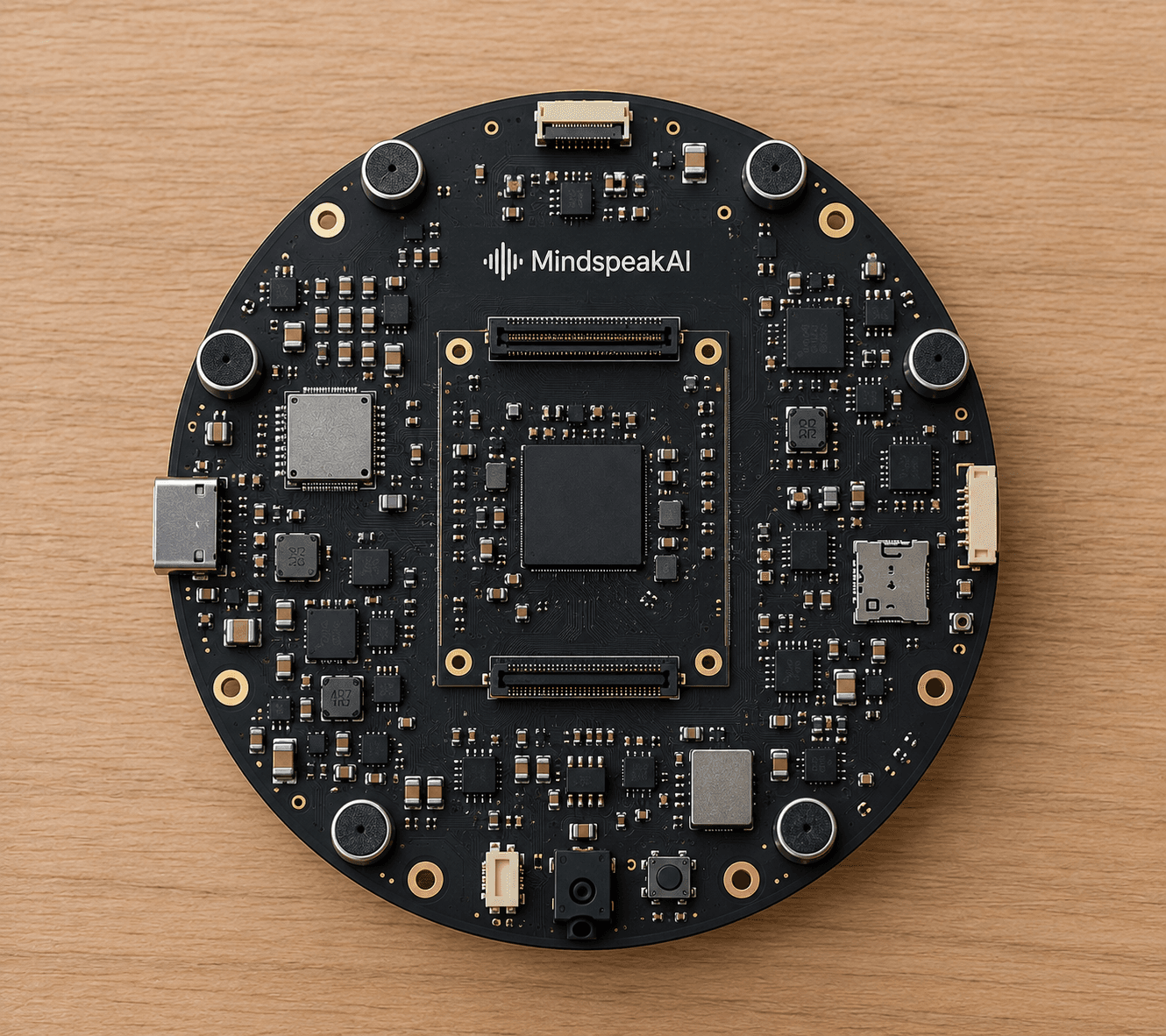
The TokoBot device is built for stores by MindSpeakAI Labs. It sits where your team works, calls out new orders, and its ring of microphones picks out whoever is speaking over the fryer and the exhaust fan. Wake word and noise handling happen on the device.
Powered by MindSpeakAI Labs
Also runs on
ReSpeaker XVF3800
4-mic array with hardware echo cancellation and beamforming, paired with a XIAO ESP32-S3. Hears your team over a busy kitchen.
ESP32-S3-BOX-3
Compact kit with mics, speaker and a touchscreen that shows the live order queue next to the voice.
DIY ESP32-S3
An ESP32-S3 with PSRAM, an I2S mic and a small amp. The cheapest way to try TokoBots in a quiet back office.
What's
ready.
what works when your device arrives, what's rolling out, and what's next*
Available now
Works when your device arrives
- Store, menu and category setup by voice
- Loyalty: points programs and stamp cards
- One queue for TokoMenus storefront, QR and app orders, with kitchen call-outs
- Accept orders, mark them ready and 86 items on TokoMenus
- Payment alerts and takings by UPI, card and cash
- Multiple named bots and switching by name
- To-dos and reminders
- Phone orders entered by your staff
Early access
Rolling out store by store; we switch it on for you
- Swiggy and Zomato orders in the same queue, with 86 and busy mode on the apps
- Customer WhatsApp replies
- Customer phone calls
- Schedules, like "every night at 11, close Zomato"
- Rain alerts and suggestions
- Owner check-ins and reports on WhatsApp
- Live stock levels and low-stock alerts
Coming soon
Planned, no dates promised
- Uber Eats, DoorDash, GrabFood and GoFood
- Customer email replies
- Purchase orders to suppliers
- Rider dispatch for your own delivery staff
- Ingredient-level stock
- Hindi, Indonesian and Malay
- A custom wake word for each bot
Get the
device.
one price per device, ordered by email. we confirm everything before you pay*
incl. GST & delivery · no monthly fee
Designed & built by MindSpeakAI Labs for TokoMenus stores. Ships within 1 week.
- In the box: the TokoBot device, a power adapter and a Wi-Fi module
- Delivered within 1 week, anywhere in India
- 1-year warranty on the device, adapter and Wi-Fi module
- TokoBots software free with TokoMenus, no monthly fee
- Bring your own AI: an API key from a provider, or a model you run locally or in your cloud
- Software updates over the air
Opens an email to tokomenus@gmail.com
Email us your order
Tap order and your email app opens with the details we need: store, city, number of devices and the apps you sell on.
We confirm by email
We reply with your invoice and payment details. The price already includes GST and delivery, and nothing is charged until you agree.
Plug in and pair
The device arrives ready to pair with your TokoMenus store. Your team can use it the same day.
TokoBots runs on a TokoMenus store. Set one up free now, or we'll help you when your device ships.
Why a
voice?
in a busy kitchen nobody has a free hand for a screen. everyone can talk*
| Capability | TokoBot | A tablet per app | Order aggregator POS |
|---|---|---|---|
| Every app's orders in one queue | |||
| Your own storefront orders in the same queue | |||
| Hands-free while cooking | |||
| Calls new orders out by name and items | |||
| Pause an item on every app at once | |||
| Knows your stock and warns before you run out | |||
| Answers customer calls, WhatsApp and email | |||
| Warns you about rain and suggests what to do | |||
| Announces payments and the mode: UPI, card or cash | |||
| Sets up your menu and loyalty by talking | |||
| Schedules, to-dos and reminders | |||
| Ask questions in plain words |
One bot,
everywhere.
The same assistant, the same permissions and the same order queue, whether you're at the pass, on the floor or across town.
Built on
toko menus*
Your menu, stock, staff roles and orders already live in TokoMenus. TokoBots works on top of them and keeps every delivery app in step, so your dashboard, staff apps and analytics just keep working, and storefront orders stay commission-free.
Explore TokoMenusTrust
built in.
the rules are enforced by the system, not left to the ai*
Asks before it acts
Rejecting an order, pausing an item or sending a purchase order is read back and needs a clear yes.
Customers get answers, not keys
Callers and messages can ask, book and order. Changing anything in the store needs a signed-in staff member, and TokoMenus roles decide who can do what.
Listens only when asked
Nothing leaves the device until the wake word or button, and the light ring shows when it's listening.
Every change is logged
Who accepted, paused or reordered what, and when, is kept in your TokoMenus activity log.
Good
questions.
Who is TokoBots for?
You and your team: you buy the device and run your store with it. Customers don't install or sign up for anything. They keep ordering through your storefront, QR codes and delivery apps, and when they call, WhatsApp or email the store, TokoBots can answer for you.
Can it answer my store's phone?
Yes. Forward your store number (or get a new one) to TokoBots and it answers: order status, hours, menu questions, table bookings and phone orders. It says it's the store's assistant, hands the call to a person whenever the caller asks or it can't help, and sends you a summary of every call.
What does it do when it rains?
It watches the forecast for your area and tells you when rain is starting, with what happened on past rainy days. It can suggest a rain charge on your own storefront deliveries, busy mode with longer prep times on the delivery apps, or pausing delivery. Delivery apps set their own rain fees for customers, so on those it only pauses or slows things down. Nothing changes until you say yes, and it switches back when the rain stops.
Can it set up my store from scratch?
Yes. On first setup, sign in with your TokoMenus account and tell TokoBots your store name, categories, items and prices. It reads each one back before saving, and you can add photos and fine-tune later in the dashboard.
Can I have more than one bot?
Yes. Create as many as you need, each with a name, a job and the people who can use it: say, one for the kitchen and one for the owner. Switch by saying "switch to" and its name, and each bot only does what its job allows.
Which payments does it tell me about?
Online payments through your TokoMenus checkout (UPI, cards and wallets via Razorpay or Stripe) as they arrive, plus cash when your team marks an order paid. You can turn spoken amounts off on a device if you'd rather not announce them in the store.
Which delivery apps does it work with?
We're connecting Swiggy, Zomato, Uber Eats, DoorDash, GrabFood and GoFood during early access, app by app and region by region. Tell us which ones you use when you order and we'll prioritise them.
Do I need TokoMenus?
Yes. TokoMenus is where your menu, stock, staff and orders live, and TokoBots works on top of it. Starting on TokoMenus is free, and we can help you set it up when your device ships.
What happens when the last item sells on two apps at once?
Stock lives in TokoMenus. When an item hits zero, TokoBots pauses it on every connected channel and tells the kitchen, so you're not cancelling orders later.
Can it accept or reject orders on its own?
Only if you turn that on. By default it calls the order out and waits for someone to accept it, and rejecting an order always needs a person to confirm.
Which languages does it speak?
English first, with Hindi, Indonesian and Malay planned, so the whole kitchen can use it.
How much does it cost?
₹10,000 per device, including GST and delivery, with a 1-year warranty. The TokoBots software is free with TokoMenus and there's no monthly fee. You only pay for the AI model you choose, and for phone or WhatsApp providers if you turn those features on.
Do I need to pay for AI?
TokoBots needs an AI model to understand and reply, and you choose which one. Add an API key from an AI provider and pay them directly for what you use, or point TokoBots at a model you run on a computer in your store or on your own cloud server. We don't add a markup.
When will it arrive, and can I return it?
We deliver within 1 week of payment, anywhere in India. You can cancel before dispatch, return it within 7 days of delivery for a full refund, and it has a 1-year warranty. See the shipping, refunds and warranty policies at the bottom of the page.
How do I order?
Email tokomenus@gmail.com (the Order button fills in the details for you). We reply with your invoice and payment details.
Does everything on this page work today?
Not yet, and we label it honestly. "Available now" features work when your device arrives. "Early access" features are rolling out store by store, and we switch them on for you as they're ready. "Coming soon" features are planned. See the What's ready section.